DOMParser - XML Parsing 2 In DOMParser everything is a node. A node has childNodes which might have childNodes. DOM Structure I always find DOMParser a better choice when the whole xml files need to be loaded to a single object. When doing a lot of calculations on the xml use a SAXParser. I will post in an example soon. Use a SAXParser over a DOMParser. Reason: SAXParser gives better performance. SAX is faster! DOMParser reads the whole XML File in the memory, if the file is big.. we might get Memory issues!
Posts
XML Parsing - 1 Lets start with the structure of XML first. XML is a way of storing data.. sample xml file: <?xml version="1.0" encoding="UTF-8 " ?> <person> <name>Richa</name> <age>100</age> <lastname>Vaidya</lastname> <address>India</address> </person> the first line gives the version of the xml i.e 1.0 the next line person is the root all the contents of the xml are a part of the root i.e. person the later lines.. these are the elements of the root. So now we have the data, how do we use it in a java program. Read it line by line? No... We have been provided with two excellent parsers : DOMParser and SAXParser . Difference between DOMParser and SAXParser., DOM reads the complete xml element, so you have the complete file in the memory and you can access the elements of the DOM root at you wish. SAX parser reads the file line by line. DOM parser has a greater memo...
Polymorphism,Overloading v/s Overriding
Polymorphism! One name.. but many functions. Polymorphism can be dynamic or passive. Dynamic as in terms of... the object knows which method to actually call when the JVM is up Passive polymorphism is when which method to call is already know when the classes are compiled. Example: We have a class A. B extends A. A has a method : public int getA(){ return 1; } B also has this method, but the value returned is different: public int getA(){ return 2; } In our main class, we create objects of A and B, always keeping reference to the object as A. So, our main looks like: A a = new A(); A b = new B(); System.out.println("a.getA() : "+a.getA()); System.out.println("b.getA() : "+b.getA()); Output: a.getA() : 1 a.getB() : 2 This is dynamic polymorphism, or overriding. If we carefully see, the method signature is the same!!!! IMP: 1. access modifier should be the same OR default can become protected, protected can be public but not otherwi...
Playing with Numbers and Variables in Python

We will try to learn how to do declare number types (integer, floating points) arithmetic expressions in python. Lets start: First we will try doing simple arithmetic expressions on numbers : For Addition, use '+' For Subtraction, use '-' For Multiplication, use '*' For Floating point division, use '/' For Integer division, use '//' For a raise to b, use a ** b. Lets demonstrate : if you want to find the speed of a train, the formula is : speed = distance / time Instead of repeatedly using values, you can use variables, lets try it out : And yes, you can use '#' to write comments whatever you write after '#' will not be processed!!! :)
Overriding toString() method in JAVA
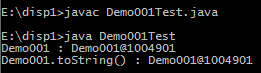
The toString() method returns the string representation that describes the object. Consider the following java program : --------------------------------------- class Demo001 { String name; public Demo001(String name) { this.name= name; } } class Demo001Test { public static void main(String[] args) { Demo001 d1 = new Demo001("Ravi"); System.out.println("Demo001 : "+d1); System.out.println("Demo001.toString() : "+d1.toString()); } } ---------------------------------------- When we run it, we get a output similar to this : This is not what we expected. We should be getting some valuable information from the object. This can be done by overridding toString() method. Example : ---------------------------------------- class Demo002 { String name; public Demo002(String name) { this.name = name; } public String toString() { return ...
First Python Program!
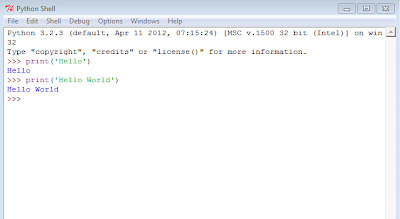
Lets start with writing the program, all the beginners write : Oh.. Isn't it like really great! Your first python program. In IDLE!!! So how does this work??? Just type anything you want to, in single quotes (' ') and all that will be printed. No what if you want to print 'Hey isn't this a wonderful day?' OOPS... Syntax Error. Reason?? Python finds for the next '. So it thinks that the string is 'Hey isn' and since it is not able to decode what the next part of the string ie. t this a wonderful day?' is., so it throws the ERROR. (Observe the color of the content written inside print() ) How to fix it?? Many ways. Lets look at some : The use of double quotes (" ") and escape character ( \ in this case) did the trick! :)
Starting with Python!

Hi... Download Python Go to this site. download the python version 3 or above . Just run the installable. Don't worry about the security. Just run it. Follow the steps for installation. They are really simple. Use "IDLE" to run python programs!