Posts

Showing posts with the label nodejs

On the path to become a MEAN Developer - 1

Image
I always wondered, But MEAN-ness rescued me! Yay! Oh well, not "being MEAN to somebody" but the MEAN Stack. ;) I am going to blog about the entire learning curve. I have a windows development machine. You get it right! I am in for a lot of challenges coming up the way to installation on my windows machine. Lets start with a brief on what a MEAN Stack is, what, who and why? MEAN is a Full Stack for Web Application Development. M - Mongo DB, a NoSQL database E - Expressjs, a web application framework that runs on Nodejs A - AngularJS, Javascript MVC framework that runs in browser Javascript engines N - NodeJS, an execution environment for event-driven server side and networking application. Did you get the best part of this stack? you need to know Java script to code to use this Stack! Only Javascript. One language to build it all. Client is a browser with javascript engine. Thats it! Though I say Javascript, I will be using Typescript. Typescript is modul...
typings error following Angularjs 2 quickstart tutorial

I got the following error when i tried npm install on the Angularjs 2/ng2 quickstart example: typings ERR! message Unable to connect to "https://api.typings.org/entries/dt/core-js/tags/0.0.0%2B20160317120654" typings ERR! caused by connect ECONNREFUSED 104.24.112.177:443 When i tried connecting to https://api.typings.org/entries/dt/core-js/tags/0.0.0%2B20160317120654 from my browser, it works fine. So the issue? Proxy problem! Create a .typingsrc file in the root directory of the project with the following content: proxy="http://proxy:port/" rejectUnauthorized=false and npm install will install with Warning, which as the quickstart example suggests can be ignored. ng2 quickstart example can be found at: https://angular.io/docs/ts/latest/quickstart.html

Running ol3cesium using nodejs on desktop

Image
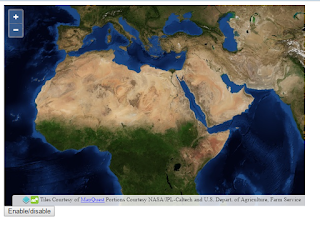
I was trying to run ol3-cesium as a desktop application. I downloaded the latest code with examples from the official site : http://openlayers.org/ol3-cesium/. When I tried opening the main.html (from examples folder) in my web browser..........  And as soon as I hit the enable/disable button view the map in 3D looks like this....... Debug and you will get an error similar to this: Cross origin requests are only supported for protocol schemes: http, data, chrome, chrome-extension, https, chrome-extension-resource. How did I solve it? Its a CORS issues and can be solved by using a web server. I used nodejs server to host the directory. Create a server.js file in your ol3-cesium root directory. The content of my server.js: =========== var http = require('http'); var fs = require('fs'); var url = require('url'); // Create a server http.createServer( function (request, response) {    // Parse the request containing file name   ...

npm ECONNREFUSED error

If you face error which says ECONNREFUSED while doing npm install <<package name>>, you are probably behind a proxy which is not allowing you to connect to the server and download the packages required. Just follow the below steps: npm config set proxy  http://your_proxy_name:port npm config set https-proxy https://your_proxy_name:port And then try npm install How to get npm config? npm get proxy will do the work :)